| Giraffen | 31 |
| Krokodilen | 0 |
| Elefanten | 0 |
| Musen Böjningslistan | 1 |
| Grisen Böjningslistan | 39 |
| Inloggade | 71 |
| Pågående | 21 570 |
Vanliga frågor


Ibland kan det dröja upp till ett dygn innan aktiveringsmejlet kommer fram till din e-post. Det finns även en risk att din e-posts spam-filter tolkat mejlet som reklam och därför placerat det i en mapp med namnet "skräppost", "junk e-mail", "spam" eller liknande . Om du kontrollerat detta och fortfarande inte fått något aktiveringsmelj kan du få ett nytt utskickat om du går till sidan för ny aktiveringslänk.
Betapet använder sig av datorportar för de olika spelrummen. En port är en kanal som information skickas igenom. Dessa portar skall vara öppna för utgående trafik. Många brandväggar tillåter utgående trafik per automatik. Om så inte är fallet kan du konfigurera brandväggen om du har behörighet att göra detta på den dator du använder dig utav. Följande portar ska vara öppna för utgående trafik: 1421-1432 & 843 mot adressen speedball.betapet.com (213.185.243.12).
- Pröva en annan webbläsare t ex Chrome, Firefox eller Opera.
- Stäng av eller ändra inställningarna i eventuell brandvägg.
- Pröva på en annan dator.
Du kan ha för låg upplösning inställd på din bildskärm. Prova att höja upplösningen i Kontrollpanelen->Bildskärm om du använder dig av Windows.
Prova att uppdatera eller att byta till en annan webbläsare.
Först och främst bör du kontrollera att din fråga inte finns i denna FAQ. Om inte det hjälper kan du kolla i forumet om det finns en diskussion med ditt problem alternativt starta en ny diskussion för att se om någon kan ge dig tips. Som en sista utväg kan du fråga en spelvärd. De har ett plus (+) framför sitt användarnamn i spelet. Det är bara att dubbelklicka på deras namn för att få upp en chattruta med dem.
Det är inte möjlighet att ändra användarnamnet när kontot väl är skapat. Det du kan göra är att registrera ett nytt konto.
Den blanka brickan fungerar som en joker, vilket innebär att du själv kan välja bokstav på den. Detta gör du genom att du för muspekaren över brickan och håller in vänster musknapp i 1-2 sekunder. Därefter väljer du bokstav och släpper musknappen.
En rullning är när en spelare har lyckats använda alla sju brickorna som man har på handen, i ett enda drag. Detta ger 50 extrapoäng utöver grundpoängen som man får för ordet.
Din rating räknas ut med hjälp av flera olika variabler. Förenklat kan man säga att det är ett mått på din prestation gentemot dina medspelare och hur många matcher du spelat. Det beror även på din egen och din motspelares rating innan ni började spelomgången. För en mer ingående förklaring se här.
Se spelregler.
Dra först ut de brickor som du vill byta till spelplanen. Därefter trycker du på knappen "Byt brickor". Det går endast att byta brickor om det finns minst sju kvar i potten.
Om din/dina motspelare också har blivit nedkopplade kan det bero på att vi startat om Betapet för uppgradering. En annan orsak kan vara att det är din uppkoppling som temporärt förlorat kontakten mot Betapet. Detta kan bero på ett flertal saker, och är det omöjligt att säga exakt var problemet ligger.
De bokstäver som är gemener är lagda med joker-brickor. Spelaren har alltså lagt ordet med en eller två joker-brickor som denne hade på handen.
Med största sannolikhet har du skrivit något i chatt-rutan och därmed har den fått fönstrets fokus. Avhjälp detta genom att klicka någonstans utanför chattrutan och prova igen.
Det enklaste är att se till att du har mer poäng än motspelaren genom att lägga dina ord som vanligt. Sen när du tröttnat passar du. Om du passar tre gånger i rad samtidigt som din motståndares tid då går ut kommer spelet avslutas automatiskt, men se till att du har flest poäng först!
Slumpen.
De ord som går att lägga bestäms av våra spelregler. Vi följer rekommendationerna från Svenska Scrabbleförbundet. Se deras hemsida för mer information.
Om tiden blir felaktig beror det med största sannolikhet på att du tappat kontakten till spelservern på Betapet. Det du kan göra är att stänga ned spelfönstret och sedan gå in i samma spelrum igen. I bästa fall har inte matchen hunnit avslutas och du får då en fråga om du vill ansluta mot spelet igen.
9 st A
2 st B
1 st C
5 st D
8 st E
2 st F
3 st G
2 st H
5 st I
1 st J
3 st K
5 st L
3 st M
5 st N
5 st O
2 st P
7 st R
8 st S
8 st T
3 st U
2 st V
1 st X
1 st Y
1 st Z
2 st Å
2 st Ä
2 st Ö
2 st jokrar
Se frågan "Hur räknas min rating ut?".
För att bjuda in någon börjar du med att klicka i "Endast inbjudningar" när du skapar spelet. Därefter högerklickar du på ett namn i spelarlistan och väljer "Bjud in" i menyn.
Om någon bjuder in dig till ett spel så blinkar det spel som du är inbjuden till med blå färg i "Nya spel"-listan. För att tacka ja klickar du på dörrsymbolen. Syns det inte i "Nya spel"-listan så har spelet redan startats med någon annan inbjuden spelare.
Hänglåset innebär att ett spel är låst av den som skapade det. Enbart inbjudna spelare kan då komma in i spelet.
Nej. Vi använder oss av något som kallas för pseudo-slump. För mer information (på engelska) om detta se här.
Betapet är en spelsajt som erbjuder möjligheten att spela för nöjes skull och under trevliga och avkopplande former. Man kan inte vinna något annat än själva spelet och alla är lika välkomna oavsett hur hög eller låg rating man har. Det här är i första hand en rolig lek!
Trots det här förekommer det ibland problem med fusk och misstankar om fusk på Betapet. Vi anser att det är självklart att det här är ett ställe där människor möts och spelar efter sin egen bästa förmåga. Då detta tyvärr inte har förståtts av alla spelare vill vi förtydliga följande:
- Det är INTE tillåtet att använda hjälpmedel i form av ordsökningsprogram eller ordlistor under pågående spel!
- Det är INTE tillåtet att spela uppgjorda matcher med kompisar eller egna ”skräpkonton” i syfte att få upp ratingen på ett annat spelkonto.
De här reglerna gäller utan undantag och spelare som bryter mot dem kommer att få sina konton avstängda.
OBS! Det är heller INTE tillåtet att anklaga andra spelare för fusk. Denna regel gäller utan undantag. Alla frågor om misstänkt fusk ska hanteras av Betapets spelvärdar. Fuskanklagelser direkt mot andra spelare kan leda till varning eller avstängning. Om du misstänker att en annan spelare fuskar: kontakta en spelvärd eller skicka ett mejl till abuse@betapet.com.
Försök att koppla upp igen så snabbt som möjligt om du misstänker att du är nedkopplad så fortsätter matchen. Det enklaste sättet att snabbt komma tillbaka till pågående match är att stänga spelrumsfönstret genom att trycka på krysset i högra hörnet. Sedan går du in i spelrummet igen och ska då få upp en ruta om att komma tillbaka till ditt pågående spel.
Vi vet att många spelare tror att fusket är utbrett. Vi delar inte den uppfattningen. Däremot vet vi att det ur trivselsynpunkt har varit ett minst lika stort problem med helt grundlösa fuskanklagelser mot andra spelare. Många ärliga spelare har tagit väldigt illa vid sig av sådant. Vi vi vill förtydliga några saker:
- Det är INTE tillåtet att anklaga andra spelare för fusk. Denna regel gäller utan undantag. Alla frågor om misstänkt fusk ska hanteras av Betapets spelvärdar. Fuskanklagelser direkt mot andra spelare kan leda till varning eller avstängning. Om du misstänker att en annan spelare fuskar: kontakta en spelvärd.
Allmänt kan sägas att det är mycket svårare att bedöma fusk än vad många spelare förstår. Det räcker aldrig med en enstaka match och man måste som regel själv vara en mycket duktig spelare för att kunna avgöra vad som kan vara fusk och vad som helt bara är skicklighet. Våra bästa spelare har ett stort ordförråd och kan massor av både långa och korta ord som de flesta mer ordinära spelare aldrig ens hört talas om.
För säkerhets skull vill vi slutligen påpeka att följande är tillåtet:
- I efterhand slå upp betydelsen av ett spelat ord i en ordlista.
- Använda sig av en s.k. stryklapp för att pricka av spelade bokstäver.
- Ha olika ordlistor som man MELLAN matcher använder för att plugga in ord.
För att kunna skriva/prata/chatta med andra på Betapet måste du se till att ha rutan där du ska skriva i fokus. Detta ordnar du genom att med hjälp av muspekaren klicka en gång i den rutan, då hamnar fokus där och det du skriver kommer att synas.
Ett plus (+) betyder att användaren är en spelvärd. Om du behöver hjälp eller om någon beter sig på ett sätt som inte är acceptabelt på Betapet så rycker spelvärden in. At-tecknet (@) betyder att användaren är en administratör. Administratörerna är ägarna till sajten. Om du har frågor eller behöver hjälp vänd dig först och främst till spelvärdarna.
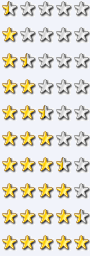
0 - 499
500 - 699
700 - 899
900 - 1099
1100 - 1399
1400 - 1799
1800 - 2199
2200 - 2599
2600 - 2899
2900 - 9999
Först märker du spelaren genom att klicka på namnet för att sedan klicka på Neka-knappen.
Giraffens namn är ännu okänt. Han kanske väljer att avslöja det en dag! Anledningen till att han har glasögon är att man måste kunna se bra för att spela Betapet :-).
En möjlighet är att skriva i forumet. Du kan även skicka ett meddelande till en spelvärd.
För att avsluta ditt medlemskap måste du först logga in på sajten. Därefter klickar du här och följer instruktionerna.
Förhållningsregler för Betapets medlemmar står beskrivet i medlemsvillkoren.
 Toppen av sidan